

Quiz games are one of the most effective tools in education. Choosing the right one for your students takes more than a quick Google search.
You’ve probably watched it happen in your own classroom. You launch a quiz game and suddenly everyone is leaning forward. The student who never raises her hand is shouting an answer. Something shifts. The research backs up what you’re seeing: a meta-analysis of 22 experimental studies found that gamified learning improves academic performance with an effect size of 0.782 [1], and separate research across 3,202 participants confirmed the same pattern [2]. Quiz games work. That part isn’t really up for debate anymore.
The real question is which quiz game to use. A tool that lights up a fourth-grade classroom might fall flat in a college lecture hall. A platform built for live, in-class energy might be useless as a homework assignment. And a game that’s free for 30 students might cost hundreds once you scale to a department.
This guide compares seven quiz game platforms available in 2026. Each is evaluated on the same set of criteria: how students access the game, whether it supports live or async play, what kind of analytics instructors get, how much it costs, and which audience it fits best.
Engageli Learning Arcade generates a quiz game from your lesson notes or topic idea in less than a minute. Students play on their own time. You see what to reteach:

What to look for in a quiz game platform
Not all quiz games solve the same problem. Some are designed for live, synchronous sessions where everyone plays at the same time. Others let students compete on their own schedule, which matters more than you'd think for homework, hybrid courses, and large cohorts. Some generate questions from your existing course materials using AI. Others require you to build every question by hand.
This guide evaluates each platform on six criteria:
- Live vs. async play: Does the game require everyone online at once, or can students play on their own time?
- AI content generation: Can it generate questions from your own notes and slides, or do you write everything manually?
- Student access friction: Do students need accounts, downloads, or app installations? The fewer barriers, the higher the completion rate.
- Game mechanics: Does it use streaks, leaderboards, multipliers, or other features that drive engagement and replay? Research consistently shows these elements increase participation [3].
- Instructor analytics: Per-question breakdowns and AI-powered insights are the difference between a fun game and a useful diagnostic tool.
- Pricing and scale: What's free, what's paid, and what happens when your class size doubles?
Engageli Learning Arcade
What if you could paste your lecture notes and have a playable quiz game 60 seconds later? Play it in class at each student's own pace, or assign it for homework!
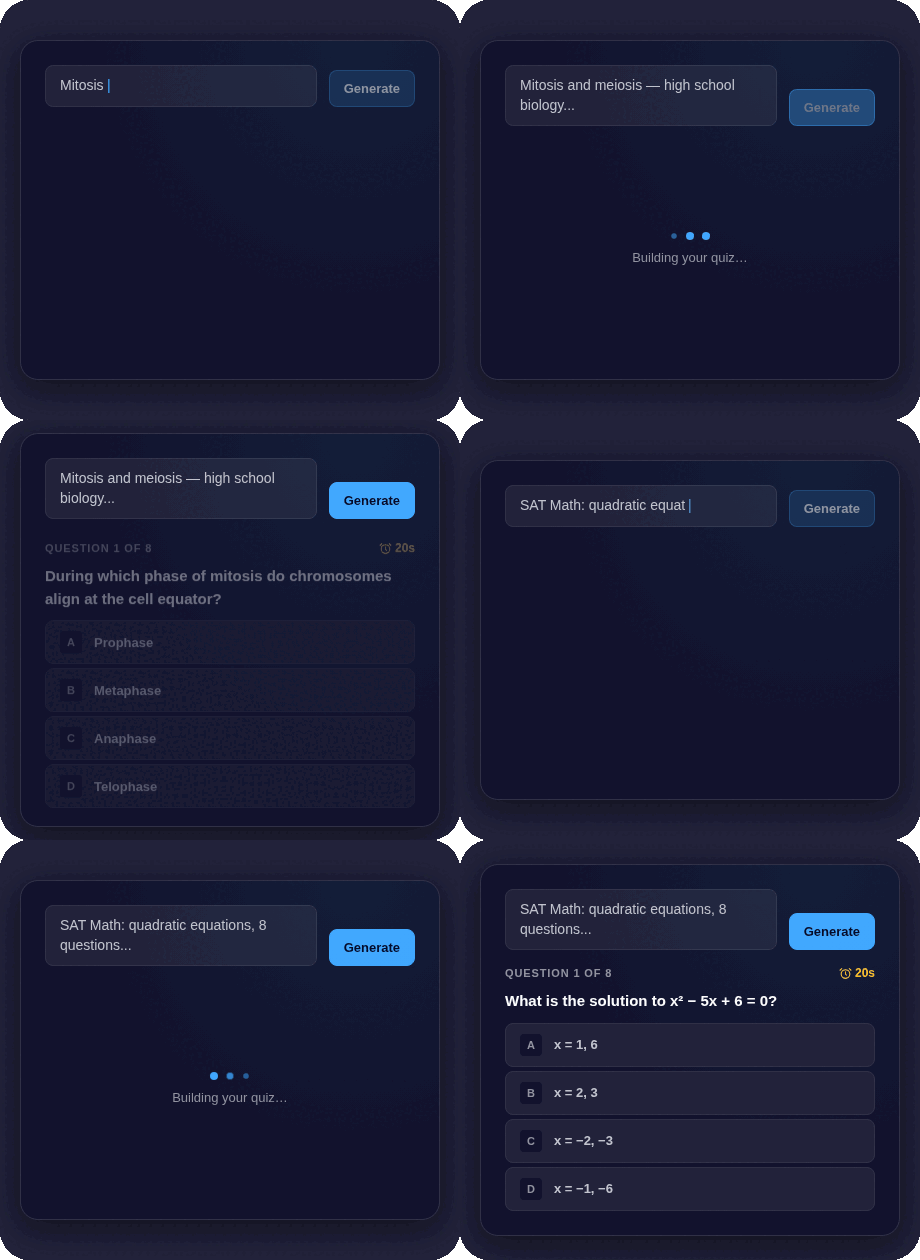 That's the premise behind Engageli Learning Arcade. Instead of building question sets by hand, instructors paste their notes, upload slides, or describe a topic (like "planets of the solar system for third graders"). AI generates a complete quiz module with questions, answer options, and explanations. Question types include multiple choice, polls, write-in, and drag-and-drop answers. You review and tweak before publishing. Then you share one link.
Students click that link, type their name, and start playing. No account creation, no app download, no device restrictions. That zero-friction model matters in practice. Anyone who has watched a class period evaporate while 12 students reset their passwords knows how much access friction costs.
The game loop is built around competition and replay. Consecutive correct answers build streaks with multiplier bonuses up to 5x. A real-time leaderboard shows where each student ranks. Personal best tracking and completion badges create a pull to play again.
One area where Learning Arcade separates itself from other quiz platforms is the instructor side. After students play, AI-powered analytics surface per-question performance data and generate a summary of what to reteach. That turns a quiz game into a formative assessment tool, with zero additional prep time for the instructor.
A community gallery offers ready-made modules for topics like SAT Math, AP Biology, Nursing Fundamentals, and more.
Pricing
- Engageli Learning Arcade is free to play! Try Engageli Learning Arcade
Strengths
-
Engageli Learning Arcade is best for homework and self-paced review across K-12, higher ed, and corporate training. It's especially valuable for instructors who want formative assessment data without building a quiz from scratch. The AI-generated questions pull directly from your notes or lesson materials, keeping the questions and answers in-line with what you're teaching while also saving you time.
Considerations
-
Learning Arcade is designed primarily for self-paced or async play. If what you need is a live, in-class game show where everyone answers the same question on a shared screen, Engageli's Sprints will give you that energy.
Kahoot
If you've taught in a K-12 classroom in the last decade, you've probably used Kahoot!
Kahoot pioneered the live classroom quiz. The format is simple: display a question on a shared screen, students answer on their devices, a leaderboard updates after every round. The room gets loud. Kids cheer.
Teachers can build quizzes from scratch or choose from a large public library. Paid plans add AI-assisted quiz creation, though it generates questions from general topics rather than from your specific course materials. Question types on paid tiers include multiple choice, puzzles, polls, and image-based answers. Integrations cover Google Classroom, Microsoft Teams, and several LMS platforms.
Pricing
-
Free tier: up to 50 players, basic question types, formative assessment reports.
-
Basic plan: $10.50/month billed annually, up to 100 players, AI content creation on general topics, expanded question types. Pro and school/district plans available at higher tiers.
Strengths
-
Kahoot is strongest in K-12 classrooms where the live format creates genuine excitement. The brand recognition is an advantage: students likely know how to play.
Considerations
-
Its weakness is the flip side of that strength. It's built for live play, which makes it a poor fit for homework or async review. The free tier caps at 50 players. And the interface, while colorful and engaging for younger students, can feel juvenile in a college lecture or corporate training session.
Blooket
Varied game formats prevent students from getting repetition fatigue.
Blooket's appeal comes down to one thing: game mode variety. Where most quiz platforms run the same format every time, Blooket wraps a single question set in different games, like Gold Quest or Battle Royale. Students can play the same material in a different game each session, which goes helps prevent repetition fatigue.
Teachers create question sets or import them from a shared library, then choose a mode. Students join with a code. Both live play and homework assignments are supported, though the richest features (enhanced reports, extended homework windows, audio questions, question bank access) sit behind the Plus subscription.
Pricing
-
Free tier: unlimited basic games, up to 60 players.
-
Plus: $4.99/month billed annually, up to 300 players, per-question reporting, homework up to 365 days.
Strengths
-
Blooket is at its best in elementary and middle school classrooms (grades 3-8). The game modes are creative and the variety keeps younger students coming back.
Considerations
-
Blooket's design skews young. High school students often find the interface childish, and adults almost certainly will. There is no AI generation from your own materials, no real higher ed presence, and analytics on the free plan are minimal.
Gimkit
Half quiz platform, half video game.
Gimkit leans harder into game mechanics than any other platform on this list. Students earn virtual currency for correct answers and spend it on upgrades, power-ups, and items. Modes like Fishtopia and Snowbrawl feel less like quiz games and more like the kind of thing students would play at home for fun. For students who are otherwise resistant to academic review, that's exactly the point.
An AI Kit generator creates question sets from a topic and grade level. KitCollab lets students contribute their own questions to a shared quiz. On paid plans, Assignments enable async homework. The free plan includes three rotating game modes (which means you don't always get the one you want), unlimited students, and basic reports.
-
Pro: $4.99/month annually or $14.99 monthly, unlocking all game modes plus homework assignments.
-
School plan: $1,000/year for a full school or $650/year for a department of up to 20 teachers.
Strengths
-
Gimkit works best for grades 5-10, where the video game aesthetic is an asset. The in-game economy and strategy layers differentiate it from simpler quiz formats.
Considerations
-
The trade-off: the game-heavy design can feel less academic. AI generates questions from topics, not from your own uploaded materials. And like Blooket, there's no higher ed or corporate footprint to speak of.
Quizizz
Self-paced play with a large content library.
Quizizz (recently rebranded to Wayground) fills a gap that many quiz games neglect: self-paced play. In self-paced mode, each student moves through questions at their own speed instead of waiting for the whole class to answer before advancing. That makes it better for differentiated instruction and homework than tools that require synchronous participation.
The content library is massive: over 20 million teacher-created activities. Many question formats are supported, from multiple choice to fill-in-the-blank to audio and video. It integrates with Google Classroom and has mobile apps for both iOS and Android.
Pricing
-
Free tier: basic quiz creation, live sessions, assignments, and library access.
-
Super ($5/month): additional question types.
-
Premium ($10/month): AI-assisted quiz generation, advanced formats, deeper reporting. School plans available for teams of 30+.
Strengths
-
Quizizz is a solid pick for K-12 teachers who want both live and self-paced options with access to a large ready-made content library.
Considerations
-
The limitations: AI quiz generation and advanced question types are paid-only. Reporting on the free plan is thin. The rebrand to Wayground may cause temporary confusion when you're searching for it. And its presence outside K-12 remains limited.
Quizlet
Quizlet isn't really a quiz game platform. But its Quizlet Live feature earns it a spot on this list.
Quizlet is first and foremost a flashcard and study tool. Quizlet Live is the feature that makes it relevant here: a team-based competitive mode where students are randomly grouped and must work together to match terms and definitions. No single student has all the answers, which forces collaboration.
Pricing
-
Free tier: browsing and creating flashcards.
-
Plus ($35.99/year): study guides, personalized practice tests, enhanced content creation.
-
Plus Unlimited ($44.99/year): expert-written solutions and additional study controls.
Strengths
-
Quizlet works for vocabulary-heavy subjects and exam prep, and Quizlet Live is effective for in-class team review.
Considerations
-
Quizlet lacks the competitive game loop that defines dedicated quiz platforms. There are no streaks, no leaderboard persistence, no replay incentive. The pricing is higher than competitors for what is, at its core, a flashcard app with a game mode bolted on.
Mentimeter
Less of a quiz game, and more of a polling feature.
Mentimeter approaches quizzes from a different angle than everything else on this list. It's a presentation tool first. Multiple-choice questions, word clouds, polls, open-ended prompts, and quiz competitions are all features you can embed directly into your slides. A Mentimeter presentation can move from lecture content to a poll to a scored quiz without switching tools.
That versatility makes it more natural in settings where a full-on quiz game show would feel out of place. Higher ed lectures and corporate training sessions are the obvious fits.
Pricing
-
Free tier: limited questions per presentation.
-
Basic ($11.99/month annually): unlimited questions and quiz competition features. Pro and Enterprise tiers available for teams.
Strengths
-
Mentimeter is a good choice when quizzes are one component of a larger interactive session, not the main event.
Considerations
-
It falls short as a standalone quiz game. The game mechanics are basic compared to purpose-built platforms. It's live-only, with no async option. And the free plan is restrictive enough that most instructors will hit the paywall quickly.
Quick comparison: quiz games for students at a glance
|
Platform |
Best Audience |
Live or Async |
AI from Your Materials |
Student Accounts Needed |
Free Tier |
Starting Paid Price |
|
Engageli Learning Arcade |
K-12, Higher Ed, Corporate |
Both |
Yes (notes, slides, topics) |
No |
Free to play! |
N/A |
|
Kahoot |
K-12 (elementary/middle) |
Live |
No (topics only) |
No |
50 players/session |
$10.50/month |
|
Blooket |
K-8 |
Both |
No |
No |
60 players/session |
$4.99/month |
|
Gimkit |
Grades 5-10 |
Both |
No (topics only) |
No |
3 rotating modes |
$4.99/month |
|
Quizizz |
K-12 |
Both |
No (paid tier, topics) |
No |
Basic quiz + library |
$5/month |
|
Quizlet |
Higher Ed, Exam Prep |
Live (Quizlet Live) |
No (notes to flashcards) |
Yes |
Basic flashcards |
$35.99/year |
|
Mentimeter |
Higher Ed, Corporate |
Live |
No |
No |
Limited questions |
$11.99/month |
How to choose the right quiz game for your students
There's no single best quiz game. But you can narrow the field quickly by asking three questions.
Who are your students? Elementary and middle school classrooms have strong options in Blooket and Kahoot, both designed with younger learners in mind. High schoolers tend to respond better to Gimkit's strategy-driven gameplay. College students and adult learners in corporate settings do better with tools that don't look and feel like they were built for an eight-year-old. That's where Learning Arcade and Mentimeter have an edge.
When will students play? If the answer is "together, live, in my classroom," Kahoot or Engageli's Sprints are the gold standard for that energy. If you need something students can do self-paced in the classroom, as homework, as review before an exam, or as an async competition that runs across a week, Learning Arcade was built for exactly that use case. Quizizz and Gimkit can handle both live and async, though their async features are less developed.
How do you want to create content? This is where the field thins out considerably. Most platforms require you to write every question by hand, pull from a crowdsourced library (which may or may not match what you actually taught), or generate questions from a generic topic. If you want a quiz game that reflects your specific lecture, your slides, your notes, Engageli's Learning Arcade is currently the only tool that generates questions directly from those materials using AI.
The quiz game market in 2026 is broad enough that there's almost certainly something here that fits your classroom, your budget, and the way your students actually learn. The right choice depends less on which platform has the most features and more on which one matches how you teach.
Ready to try it? Engageli Learning Arcade generates a quiz game from your materials in under 60 seconds. No student accounts. No downloads. AI-powered analytics tell you what to reteach. Try today:
References
[1] Zeng, J., Parks, S., & Shang, J. (2024). Exploring the impact of gamification on students’ academic performance: A comprehensive meta-analysis of studies from 2008 to 2023. British Journal of Educational Technology, 55(5), 1989-2010.
[2] Sailer, M. & Homner, L. (2020). The gamification of learning: A meta-analysis. Educational Psychology Review, 32, 77-112.
[3] Ding, L., Kim, C., & Orey, M. (2024). Investigating the impact of gamification components on online learners’ engagement. Smart Learning Environments, 11(1), 1-22.