

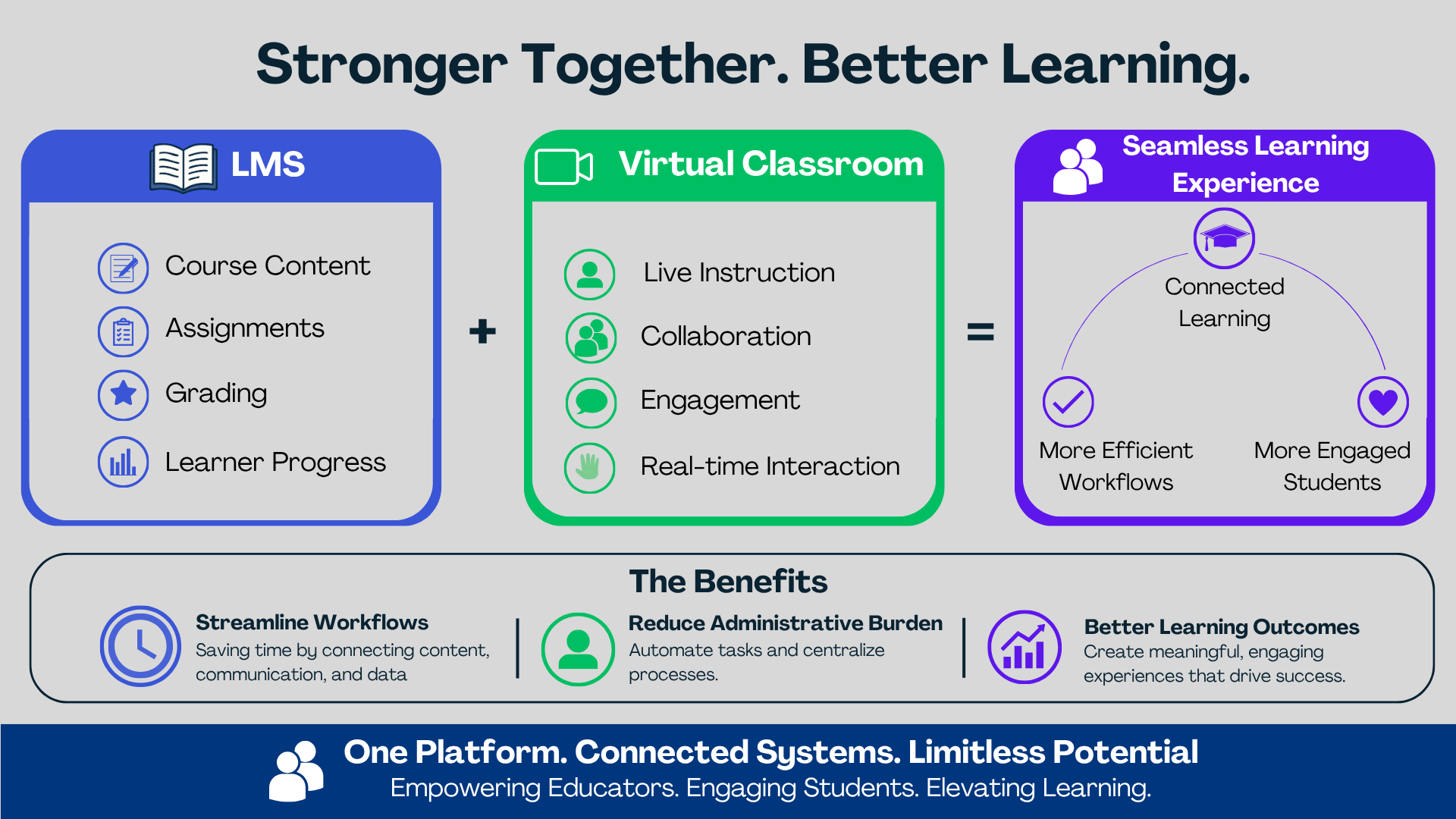
A learning management system (LMS) serves as the hub for course content, assignments, grading, and learner progress, while a virtual classroom powers live instruction, collaboration, and engagement. When these systems work together, educators can streamline workflows, reduce administrative burden, and create a more seamless learning experience for learners.
By integrating your LMS with a virtual classroom platform through the Learning Tools Interoperability (LTI) handshake, learners can access classrooms securely from the LMS. The virtual classroom tool is configured inside the LMS and the LMS acts as the platform of record and launches the virtual classroom as an external tool. No separate login is needed because of the Single Sign-On (SSO) natively built into LTI.
Understanding Integration in Digital Learning Ecosystems
Integration refers to the process of connecting different systems so they work together seamlessly, share data automatically, and create a unified user experience.
Engageli’s LTI 1.3 Advantage integration delivers a secure plug-and-play solution that authenticates classroom access directly through the LMS.
Attendance and engagement data from the virtual classroom can be passed back to the LMS gradebook, creating a more holistic educational solution that gives institutions deeper visibility into learner participation and class progress while also providing learners with intrinsic motivation through greater awareness of their performance and engagement.
Why it Matters
Institutions are increasingly seeking ways to automate administrative processes so staff and instructors can focus on higher-value activities that improve learner outcomes, operational efficiency, and overall ROI.
Learners can join live classes directly from the LMS without managing separate links, accounts, or passwords. Faculty can manage both asynchronous and synchronous learning activities from a familiar workflow.
Auto Provisioning of Classes, Users, Rosters
With LTI integration enabling automatic creation of Engageli classes, users, and rosters, instructional designers are freed from manual setup tasks, as the first click on the LTI link triggers seamless auto-provisioning of the virtual classroom environment.
Add/drop Roster Management
As learners are added or dropped from a course, roster updates in the LMS are automatically synced with Engageli class rosters through the LTI integration, ensuring that only currently active, authenticated learners retain access to the virtual classroom.
Team Teaching Opportunities
Multiple LMS courses can be integrated to a single Engageli virtual classroom to enable team teaching while preserving each learner’s original course enrollment data, allowing instructors to view and filter engagement analytics specific to their course enrolled learners.
Team teaching is important because it brings together multiple instructors to combine expertise, perspectives, and teaching styles, which can lead to a richer, more dynamic learning experience. It also strengthens community building by giving learners opportunities to engage with a wider range of classmates, fostering broader peer connections and collaboration.
Connected Data Set
With the integration, the LTI handshake securely passes the LMS course ID, LMS user ID, and SIS ID, creating a connected data set aligned with LMS data, eliminating the need for costly and error-prone data transformations while enabling a unified data lake view of student activity across systems.

Passback
Engagement grades from the virtual classroom are passed back to LMS gradebook columns after the session has ended, saving instructor time for manual entry and improving data accuracy.
Section Size Increases
With roster management and passback handled automatically, instructors can spend less time on administrative tasks and more time engaging students, making it possible to support larger class sizes without compromising rigor.
API Suite
By passing key LMS identifiers through the integration, institutions can create a unified data foundation that links classroom engagement with LMS activity. When this data flows into the institutional data lake, it enables more personalized student services, predictive analytics, and data-driven decision-making across the campus ecosystem.
Daily Workflow
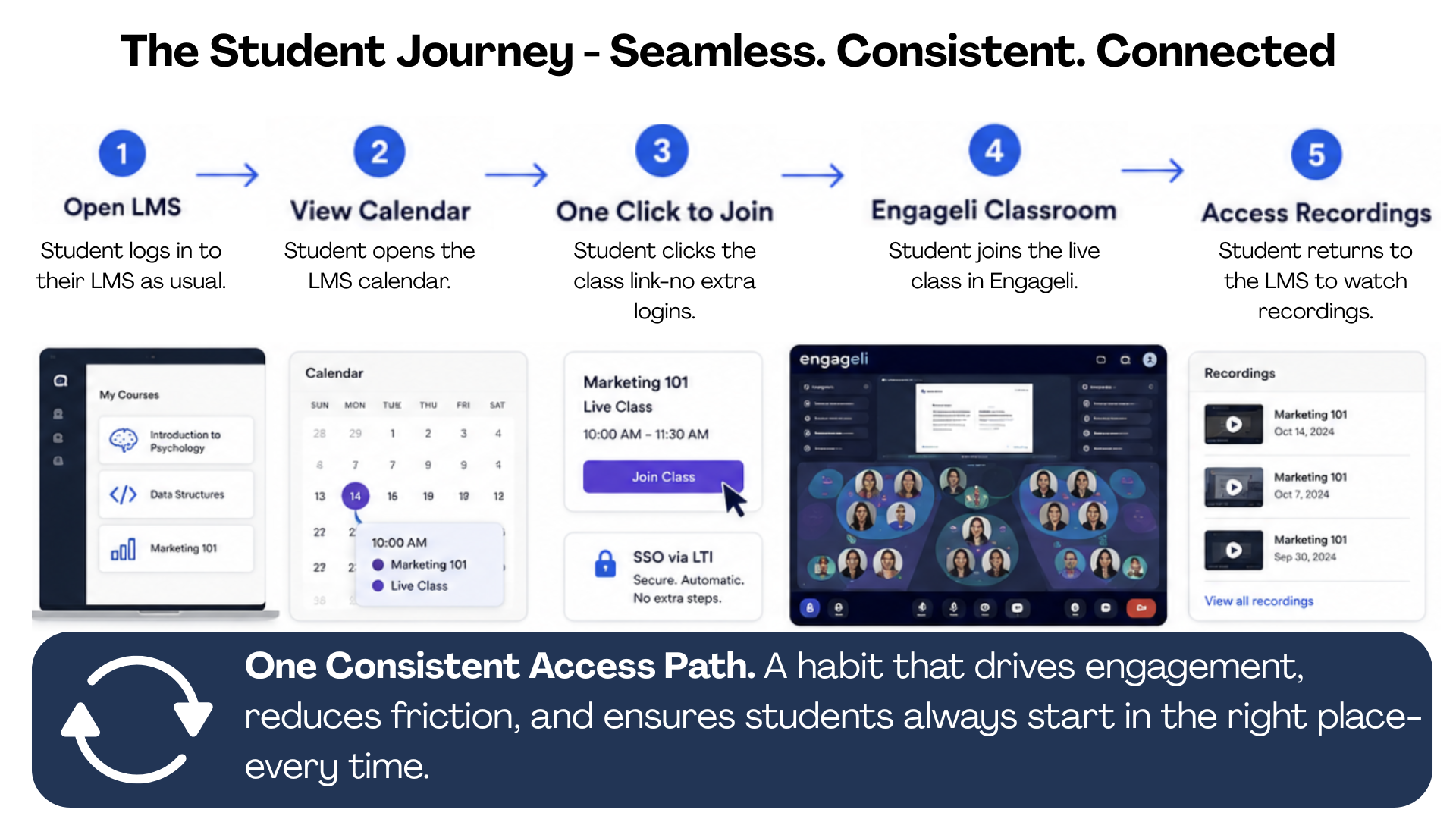
With over 5 million logins a week on Engageli and 95% occurring through LTI, the LMS-to-classroom integration is mission critical. Students expect a single click from their LMS calendar to enter a live class, access recordings, and continue learning without additional logins or navigation. What appears to be a simple access path is actually the foundation of a connected learning ecosystem. This consistent access path creates a habit and ensures learners always follow the same mechanism regardless of which course they are enrolled in.
In Conclusion
The LMS-virtual classroom integration bridges the gap between asynchronous and synchronous learning by linking LMS data with real-time classroom engagement. The result is a richer, more complete view of student learning that supports earlier interventions, improved outcomes, and more personalized student support.
In short, LMS and virtual classroom integration is not just a technical enhancement but is a foundational step toward more connected, scalable, and data-driven education.
Frequently Asked Questions
What information is shared between the LMS and the virtual classroom?
Identity and Access Data: Student and instructor LMS and SIS IDs, LMS course IDs and section information, Role information (student, instructor, TA), Authentication data for single sign-on (SSO)
Enrollment and Roster Data: Course rosters, Add/drop updates as enrollment changes, Cross-listed or multi-section mappings
Assessment : Attendance, Quiz/Sprint scores through passback into the LMS gradebook
What challenges does LMS and virtual classroom integration solve?
LMS and virtual integration solves the fragmented learning experience across different systems and removes the data silos. Integrated data enables faster, more proactive student support. Multiple credentials and platforms create friction for students. Integration typically enables authenticated access so learners can access live sessions directly from the LMS.
What insights can institutions gain from combining LMS and classroom data?
Combining LMS and classroom engagement data gives institutions a more complete view of the student learning journey, moving beyond simple attendance to understand how learners are actually engaging with the course. This data provides early risk indicators to enable instructors to intervene and provide necessary student services for retention.
What should institutions look for when evaluating LMS and virtual classroom integrations?
When evaluating LMS and virtual classroom integrations, institutions should look beyond basic connectivity and focus on how well the integration supports teaching, learning, and operational efficiency. The integration should meet the institution requirements of security and privacy, and simplify workflows. Session recordings, notes, and classroom artifacts should be easily accessible through the LMS to support review and asynchronous learning.
What are the best LMS software platforms with virtual classroom capabilities?
When evaluating LMS platforms like Canvas, Blackboard, Moodle, D2L Brightspace, Sakai, and Schoology with virtual classroom capabilities, it's important to distinguish between LMSs with built-in virtual classrooms and LMSs that integrate with specialized virtual classroom platforms. Any LMS platform that supports LTI 1.3 and allows integration with a dedicated virtual classroom platform rather than relying solely on basic meeting functionality. This approach provides the flexibility of a full LMS while enabling richer live learning experiences.