

In a single online class period, a teacher is often expected to deliver instruction, manage the technology, monitor participation, facilitate discussion, run activities, track attendance by hand, answer questions, assess understanding, read the room, and follow up afterward. The right virtual classroom platform should absorb most of that load, not add to it.
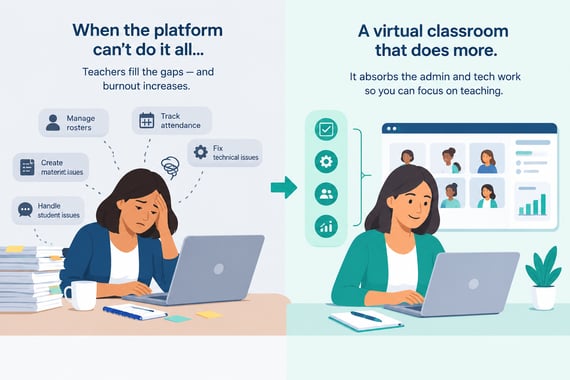
Here are seven places where the class management overload weight can come off.
1. Reduce the Workload of Managing Large Classes
Engageli's persistent small-group Tables stay intact across sessions, so a teacher sets up groups once instead of rebuilding breakout rooms every class. Students return to the same table each time they log in, with the same peers and the same shared workspace, and the teacher can move between tables, listen in, and join a conversation without interrupting it. The work of learning gets distributed across the room instead of funneled entirely through the teacher.
2. Make Participation Visible Without Manual Tracking
A virtual classroom built for teaching, not meetings, should track participation signals directly: chat activity, table conversation, poll responses, and time on task, and surface them without the teacher reconstructing any of it by hand. A teacher glancing at a participation view mid-class can see who has gone quiet and check in on that student, rather than guessing from a grid of video tiles. For a district or institution that must answer for attendance in an audit, this also turns a guess into a record.
3. Automate Routine Classroom Tasks With AI
AI tools built into the classroom can generate class summaries, flag recurring questions and sentiment patterns in the chat, build quizzes from what was covered, and capture notes automatically, so a teacher finishing a session doesn't have to rebuild any of that from memory. The goal isn't to replace the teacher. It's to shift AI from one more system to manage into an assistant that handles preparation and follow-up, the kind of task that otherwise eats into a teacher's evening.
4. Cut Down on Tool-Switching
Jumping between video conferencing, a polling tool, a separate whiteboard, breakout room controls, and a quiz platform adds friction to every transition, and that friction compounds over a class period. Bringing polling, whiteboards, quizzes, and small-group collaboration into the classroom itself means a teacher runs a lesson from one interface instead of a scavenger hunt across five browser tabs. Fewer systems to manage in real time means fewer moments spent troubleshooting software instead of teaching.
5. Put Engagement Analytics in a Dashboard
Instead of manually reviewing a session after the fact to figure out who struggled with a concept, a teacher should be able to open a dashboard and see it directly, then decide who needs a follow-up before the gap shows up on an assessment. That means capturing digital participation signals as they happen and surfacing them in a way that points to knowledge gaps, not just attendance. One Engageli higher education customer reported an 18% increase in course completion where instructors had this kind of visibility built into the platform.
6. Support Flipped Classroom Models
A virtual classroom platform should manage recordings automatically in the background, tied to the same link used for live sessions, so a teacher records a lesson once inside the classroom they already teach in rather than producing and hosting a separate video library. Students access the recording ahead of the live session, at their own pace, and arrive ready to apply what they reviewed instead of hearing it for the first time. Live class time goes toward discussion and application instead of repeating a lecture that could have been asynchronous.
7. Give Teachers Real Classroom Management Controls
Teachers need controls at both the class level and the individual student level, along with authenticated access and a waiting room, to keep a session on track and secure. A teacher should be able to mute, manage, or redirect a specific student without disrupting the rest of the class, and trust that only enrolled students are in the room in the first place. Classroom management stops being something a teacher must engineer around a meeting tool that was never built for it.
What Manual Workflows Cost Teachers, and What a Virtual Classroom Should Handle Instead
|
Task |
Manual workflow |
What the platform should automate |
|---|---|---|
|
Small-group learning |
Rebuilding breakout rooms every session |
Persistent Tables that carry over across classes |
|
Attendance and participation |
Counting logins or checking cameras |
Participation tracked automatically from digital signals |
|
Class prep and follow-up |
Writing summaries and quizzes from memory |
AI-generated summaries, quizzes, and notes |
|
Live-class tooling |
Switching between polling, whiteboard, and quiz apps |
Polling, whiteboards, and quizzes inside one classroom |
|
Identifying knowledge gaps |
Reviewing recordings or chat logs after the fact |
Engagement analytics surfaced in a live dashboard |
|
Recorded content |
Producing and hosting a separate video library |
Recordings managed automatically behind one class link |
|
Classroom order and safety |
Informal moderation and manual entry checks |
Built-in class and student-level controls, waiting rooms |
The Bigger Picture
None of these seven changes require a teacher to work harder or learn a more complicated system. They require a platform built to teach in, not a meeting tool stretched to cover a classroom. That difference shows up in a teacher's calendar by the end of the week, whether or not it shows up on a feature list.
Key Takeaways
- Teacher burnout in online classes increases when they have to fill manually fill gaps that the virtual classroom software cannot do.
- A virtual classroom platform should absorb the administrative and technical work around teaching, not add another system to manage.
- Persistent small-group tables cut the setup and monitoring work of managing large classes.
- Automatic participation tracking and engagement dashboards replace manual guesswork with an authoritative record.
- AI can take on repetitive prep and follow-up tasks without replacing the teacher's judgment.
- Consolidating polling, whiteboards, and quizzes into one classroom cuts down on tool-switching fatigue.
- Flipped classroom support and built-in management controls give teachers back time and order.
Frequently Asked Questions
What causes teacher burnout in online classes?
It's rarely one factor. It's the accumulation of tasks a teacher handles simultaneously: delivering instruction, managing technology, tracking participation manually, and switching between disconnected tools, often with no built-in way to see whether students are engaged.
Does automating classroom tasks with AI replace the teacher?
No. The goal is to take over repetitive, low-judgment tasks, like generating a summary or drafting a quiz from class content, so a teacher's time goes toward preparation, follow-up, and the parts of teaching that require human judgment.
How is a flipped classroom different from just recording every class?
A flipped model uses recorded content for first exposure to material, so students arrive at the live session ready for discussion and application instead of a first-time lecture.